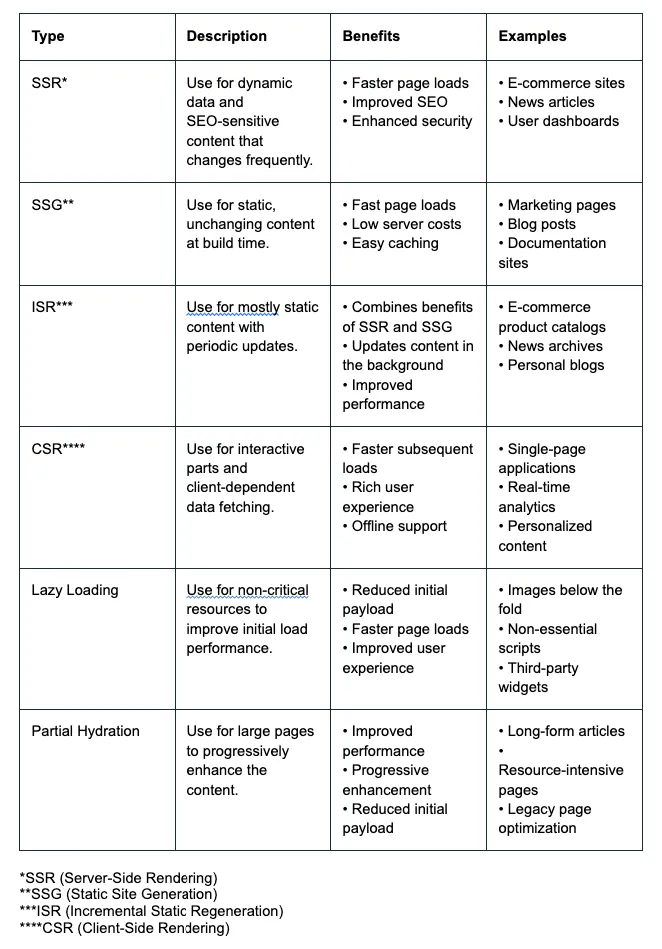
In modern web development, selecting the appropriate rendering technique is essential for enhancing both performance and the user experience.
This guide will focus on contemporary strategies, with practical examples centered around Next.js. We’ll explore the optimal use cases for Server-Side Rendering (SSR), Static Site Generation (SSG), Incremental Static Regeneration (ISR), Client-Side Rendering (CSR), Lazy Loading, and Partial Hydration to ensure your enterprise application is fast and responsive.

1. Server-Side Rendering (SSR)
When to use:
- Dynamic Data: Pages that need to display data that changes frequently and must be up-to-date on every request, such as user profiles or real-time dashboards.
- SEO: Pages that benefit from SEO where the content changes based on user interaction or real-time data, like product pages with live inventory.
Example:
export async function getServerSideProps(context) { const res = await fetch(`https://api.example.com/data`); const data = await res.json(); return { props: { data } };}Scalability Considerations:
SSR can be resource-intensive on the server, especially for high-traffic applications. To scale SSR effectively:
- Implement caching strategies to reduce the load on your servers.
- Consider using a CDN to distribute the load geographically.
- Optimize your server-side code to minimize response times.
2. Static Site Generation (SSG)
When to use:
- Static Content: Pages with content that doesn’t change often, such as blog posts, documentation, marketing pages, or product descriptions.
- Build Time Rendering: When you can generate the pages at build time, making the site faster by serving pre-rendered HTML.
Example:
export async function getStaticProps() { const res = await fetch(`https://api.example.com/data`); const data = await res.json(); return { props: { data } };}export async function getStaticPaths() { const res = await fetch('https://api.example.com/items'); const items = await res.json(); const paths = items.map((item) => ({ params: { id: item.id } })); return { paths, fallback: false };}Scalability Considerations:
SSG is highly scalable as it reduces server load. However, as your site grows:
- Build times may increase significantly.
- Consider using Incremental Static Regeneration (ISR) for large sites.
- Implement a robust CI/CD pipeline to manage frequent builds.
3. Incremental Static Regeneration (ISR)
When to use:
- Hybrid Approach: Combines static generation and server-side rendering for pages that can be mostly static but require periodic updates.
- Content Updates: When the content needs to be updated at regular intervals without rebuilding the entire site.
Example:
export async function getStaticProps() { const res = await fetch(`https://api.example.com/data`); const data = await res.json(); return { props: { data }, revalidate: 10 }; / Regenerate the page every 10 seconds}Scalability Considerations:
ISR offers excellent scalability by combining the benefits of SSG and SSR:
- It reduces the load on your servers compared to full SSR.
- Allows for more frequent updates than traditional SSG without impacting build times.
- Consider adjusting the revalidation period based on your content update frequency and traffic patterns.
4. Client-Side Rendering (CSR)
When to use:
- User Interaction: For components or parts of the page that rely heavily on user interaction, such as forms, search functionality, or interactive elements.
- Data Fetching on Client: When data can be fetched client-side after the initial page load.
Example:
useEffect(() => { fetch('/api/data') .then((res) => res.json()) .then((data) => setData(data));}, []);Scalability Considerations:
CSR can offload work from your servers to the client’s browser:
- Ensure your APIs can handle increased load as your user base grows.
- Implement efficient caching strategies on the client-side to reduce API calls.
- Consider using service workers for offline functionality and improved performance.
5. Lazy Loading
When to use:
- Performance Optimization: To defer the loading of non-critical resources at page load time, improving initial load performance.
- Below-the-Fold Content: Content that isn’t immediately visible to the user, such as images, videos, or components further down the page.
Example:
const LazyComponent = dynamic(() => import('../components/LazyComponent'), { loading: () => <p>Loading...</p>,});Scalability Considerations:
Lazy loading can significantly improve the scalability of your application:
- It reduces the initial bundle size, leading to faster load times.
- Implement code splitting to further optimize your application as it grows.
- Monitor and adjust your lazy loading strategy based on user behavior and device capabilities.
6. Partial Hydration / Progressive Hydration
When to use:
- Large Pages: For large pages where you want to progressively hydrate the components, improving perceived performance and reducing the initial load time.
Example: Use frameworks like react-imported-component or consider splitting components and using placeholders that hydrate progressively.
Scalability Considerations:
Partial hydration can greatly enhance the scalability of complex applications:
- It allows you to prioritize the interactivity of critical components.
- Reduces the JavaScript execution time on initial load.
- Consider implementing a strategy to measure and optimize component hydration as your application grows.
Summary
By carefully choosing the appropriate rendering strategy for each part of your website, you can optimize both performance and user experience. This structured approach ensures that your web application remains responsive, efficient, and user-friendly.
Real-World Scenarios
Let’s explore how these rendering techniques can be applied in different types of web applications:
1. E-commerce Platform
- Homepage: Use SSG with ISR for the main content, with CSR for personalized recommendations.
- Product Listing Pages: Implement SSG with ISR, updating every few hours or when inventory changes.
- Product Detail Pages: Use SSG with ISR, updating daily or when product details change.
- Shopping Cart: Implement CSR for real-time updates and interactions.
- Checkout Process: Use SSR for security and to ensure up-to-date information.
- User Account Pages: Implement SSR for personalized, secure content.
2. News Website
- Homepage: Use SSR to ensure the latest news is always displayed.
- Article Pages: Implement SSG with ISR, updating hourly or when edits are made.
- Comment Sections: Use CSR for real-time updates and interactions.
- Search Functionality: Implement CSR for instant results as users type.
- Media Galleries: Use lazy loading for images and videos to improve initial load times.
3. SaaS Dashboard
- Login Page: Use SSR for security and to handle authentication.
- Main Dashboard: Implement SSR for the initial load, with CSR for real-time updates.
- Data Visualization Components: Use lazy loading and CSR for complex, interactive charts.
- Settings Pages: Implement SSR to ensure the latest user preferences are displayed.
- Help Documentation: Use SSG for static content that doesn’t change frequently.
Applying Rendering Strategies: Interview Scenarios
To better understand how these rendering strategies can be applied in real-world situations, let’s examine two hypothetical interview scenarios. These examples illustrate how a senior developer might discuss rendering choices with a junior developer, providing insights into the decision-making process for different types of web applications.
Example 1: E-commerce Site
Senior Dev (SD): Hi, let’s go over a scenario. Imagine we’re working on a Next.js e-commerce website with a homepage, product listing pages, product detail pages, user profile pages, and a real-time chat support feature. How would you decide which pages or components should be SSR, SSG, CSR, or use lazy loading?
Junior Dev (JD): For the homepage, I would use SSR because it needs to load quickly for SEO purposes and might have dynamic content.
SD: That’s a good choice. What about product listing pages? How would you handle those?
JD: I think I would use CSR because the content might change frequently and we want it to be up-to-date.
SD: CSR can be useful, but it might lead to slower initial load times. Can you think of a more efficient approach?
JD: Hmm, maybe SSR then, since the data is dynamic?
SD: Consider the trade-offs. SSR can handle dynamic data, but it puts more load on the server. What about SSG with incremental static regeneration (ISR)?
JD: Oh, right. SSG with ISR could be used here to generate static pages at build time and update them periodically.
SD: Exactly. Now, how would you handle product detail pages?
JD: I think I would use SSR again because the content is dynamic.
SD: SSR is an option, but consider that product details might not change very frequently. What other approach might be more performant?
JD: Maybe SSG? We could pre-generate the pages at build time.
SD: SSG is a good start. You can use ISR for those too. What about user profile pages?
JD: User profiles should definitely be SSR since the data is personalized and needs to be up-to-date.
SD: That’s correct. Lastly, how would you handle the real-time chat support feature?
JD: For the real-time chat, I would use CSR because it requires frequent updates and interactions from the user.
SD: Exactly, CSR is appropriate here. How about lazy loading? Where would you apply it in this scenario?
JD: We could use lazy loading for images and any components that are below the fold or not immediately visible.
SD: That’s right. Lazy loading images and non-critical components helps improve initial load performance. Keep practicing and considering the implications of each choice.
Example 2: Performance Review Site
Senior Dev (SD): Hi, let’s go over a scenario. Imagine we’re working on a Next.js enterprise performance review software application with a dashboard, employee profile pages, performance review forms, feedback pages, and a real-time collaboration feature for managers. How would you decide which pages or components should be SSR, SSG, CSR, or use lazy loading?
Junior Dev (JD): For the dashboard, I would use SSR because it needs to load quickly and might have dynamic data.
SD: SSR for the dashboard can be a good choice for dynamic content. What about employee profile pages? How would you handle those?
JD: I think I would use CSR because the content might change frequently and we want it to be up-to-date.
SD: CSR can be useful, but it might lead to slower initial load times. Can you think of a more efficient approach?
JD: Hmm, maybe SSR then, since the data is dynamic?
SD: Consider the trade-offs. SSR can handle dynamic data, but it puts more load on the server. What about SSG with incremental static regeneration (ISR)?
JD: Oh, right. SSG with ISR could be used here to generate static pages at build time and update them periodically.
SD: Exactly. Now, how would you handle performance review forms?
JD: I think I would use SSR again because the content is dynamic.
SD: SSR is an option, but consider that review forms might not change very frequently once filled out. What other approach might be more performant?
JD: Maybe SSG? We could pre-generate the forms at build time.
SD: SSG is a good start, especially if the forms are mostly static templates. What about feedback pages?
JD: Feedback pages should definitely be SSR since the data is personalized and needs to be up-to-date.
SD: That’s correct. Lastly, how would you handle the real-time collaboration feature?
JD: For the real-time collaboration, I would use CSR because it requires frequent updates and interactions from the user.
SD: Exactly, CSR is appropriate here. How about lazy loading? Where would you apply it in this scenario?
JD: We could use lazy loading for components that are below the fold or not immediately visible, like detailed performance charts.
SD: That’s right. Lazy loading components like charts can help improve initial load performance. Keep practicing and considering the implications of each choice.